
Multimodal Search

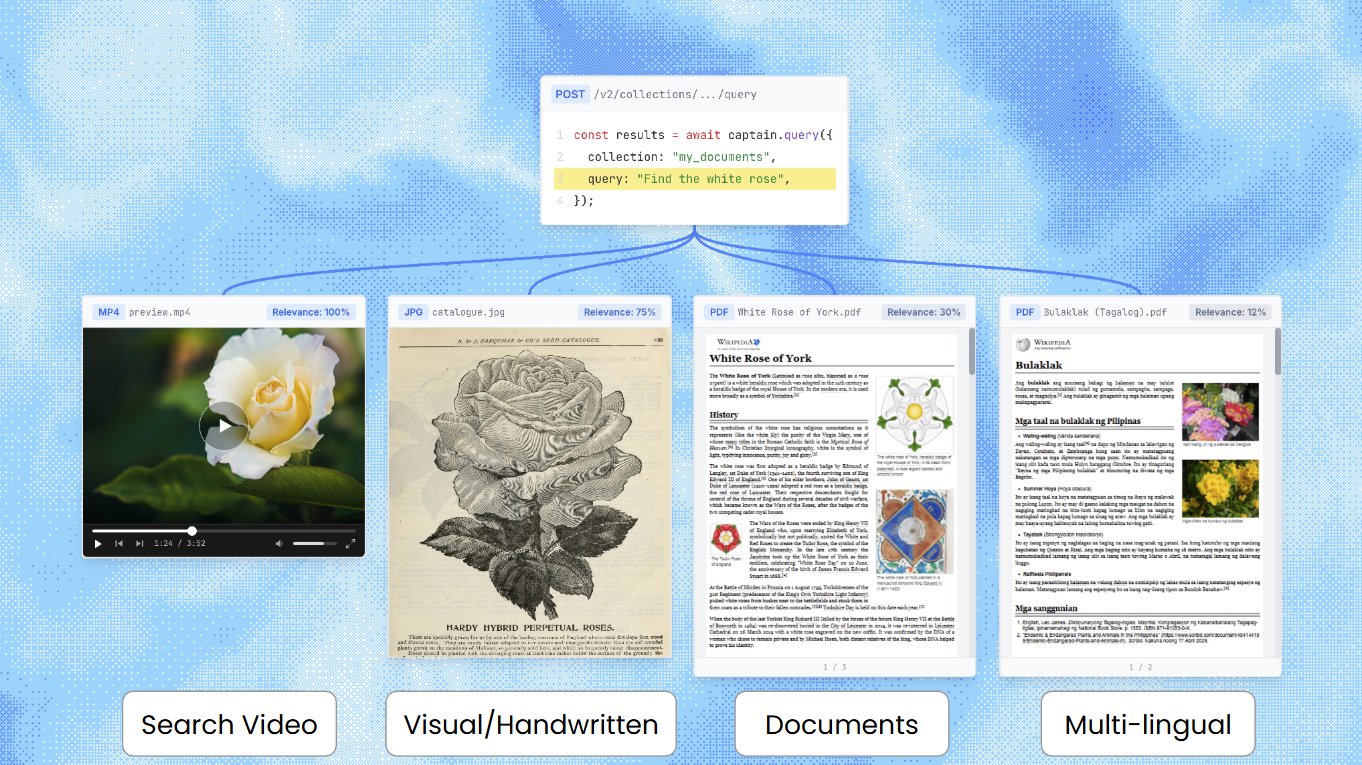
Multimodal search across video, images, and documents

Captain supports native multimodal search across text documents, images, video, and audio files. Upload any combination of file types to a single collection, and search across all of them with one query. Captain handles format detection, media segmentation, embedding, and cross-modal ranking automatically.

Benchmark Results

On MRAG-Bench (ICLR 2025), a standardized academic benchmark for vision-centric retrieval with 16,130 images and 1,251 questions, Captain achieves 81.3% retrieval accuracy-outperforming every end-to-end RAG system tested in the paper, including GPT-4o with CLIP retrieval (68.96%). Full results, methodology, and evaluation code are available in our open-source evaluation repository.
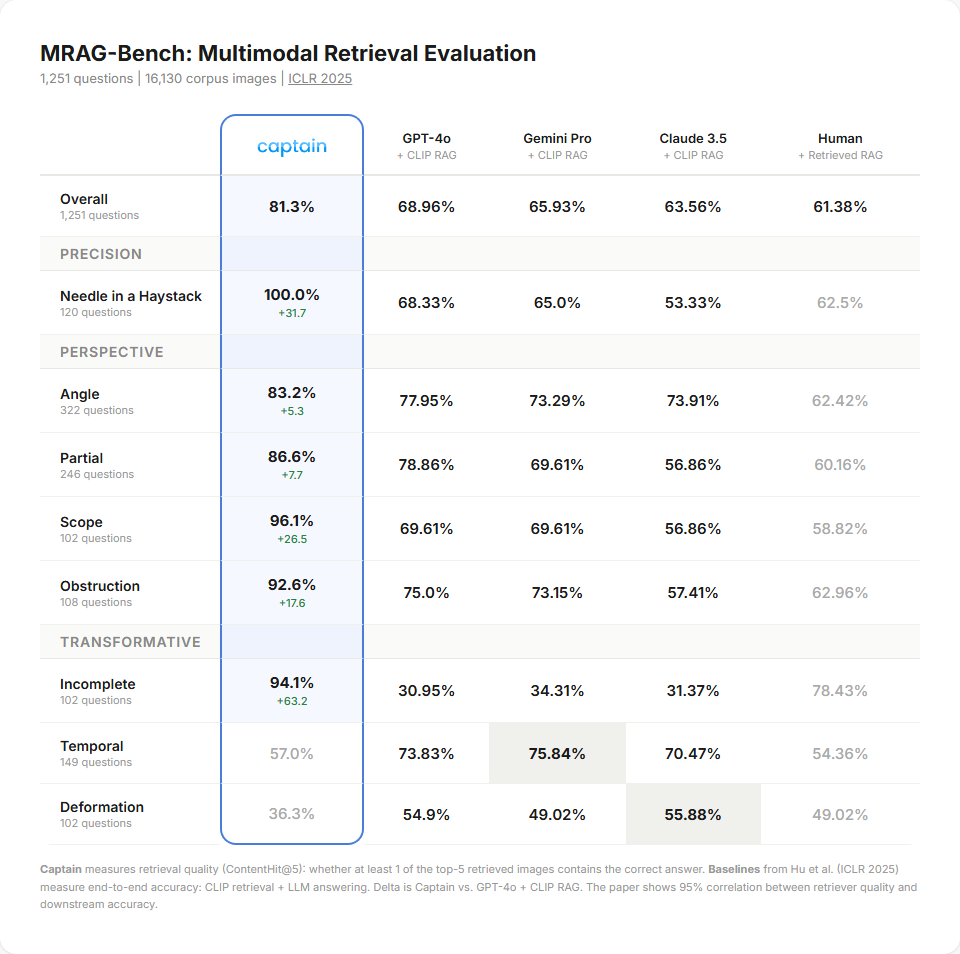
MRAG-Bench multimodal retrieval evaluation results

Supported File Types

ModalityFormatsProcessing
DocumentsPDF, DOCX, DOC, TXT, MD, JSON, YAML, CSV, XLSXText extraction, chunking, and semantic embedding
ImagesPNG, JPEG, GIF, BMP, TIFF, WEBPNative multimodal embedding + visual description
VideoMP4, MOV, AVI, MKV, WEBM, FLV, WMVSegmented into ≤120s clips, natively embedded
AudioMP3, WAV, AAC, FLAC, M4A, OGG, WMASegmented into ≤80s clips, natively embedded

How It Works

Captain uses a dual embedding strategy for media files. Each image, video segment, or audio segment is embedded in two ways:

  1. Native multimodal embedding (3072 dimensions): The raw bytes-image pixels, audio waveform, video frames-are embedded directly. This captures the actual visual, auditory, or temporal content.

  2. Text embedding (1024 dimensions): A model generates a structured description of what the media actually contains (a transcript for audio, a visual description for images and video), and that text is embedded alongside your text documents. Your query matches the content of the media, not just its filename.

This dual approach means a query for a song finds audio files both by matching the sound of the music (native embedding) and by matching the transcribed lyrics (text embedding). A search for the line “uptown funk you up” surfaces the right track even when the file is named track03.mp3.

Why reranking is required

Relevance scores from text search and media search are produced by different models on different scales. A text reranker score of 0.7 and a media cosine similarity of 0.7 do not mean the same thing and cannot be sorted into a single list.

Captain solves this with reranker-informed pipeline weighting: the text reranker’s scores on media descriptions are used to determine how much weight each modality should receive in the final ranking. This is why rerank=true is required for multimodal collections-without the reranker, there’s no way to produce a meaningful cross-modal ranking.

Text-only collections

If your collection contains only text documents, multimodal search adds zero overhead. Captain automatically detects whether a collection has media content and skips the multimodal pipeline entirely for text-only collections.

Querying Multimodal Collections

Reranking is required when a collection contains multimodal content (images, video, or audio). If you set rerank=false on a multimodal collection, the query fails. Text-only collections work with rerank=false as before.

1import requests
2import uuid
3
4BASE_URL = "https://api.runcaptain.com"
5API_KEY = "your_api_key"
6headers = {
7 "Authorization": f"Bearer {API_KEY}",
8 "Content-Type": "application/json",
9 "Idempotency-Key": str(uuid.uuid4())
10}
11
12response = requests.post(
13 f"{BASE_URL}/v2/collections/my_media_library/query",
14 headers=headers,
15 json={
16 "query": "product demo with live dashboard",
17 "inference": False,
18 "rerank": True,
19 "top_k": 10
20 },
21 timeout=120.0
22)
23
24data = response.json()
25for result in data["search_results"]:
26 modality = result["metadata"].get("modality", "text")
27 print(f"[{modality}] {result['filename']} | score: {result['score']:.3f}")
28 # For media results, the segment timestamps are embedded in the content
29 # label, e.g. "[Video: product_demo.mp4, 120s-240s]".
30 print(f" {result['content'][:100]}")

Response:

1{
2 "success": true,
3 "inference": false,
4 "search_results": [
5 {
6 "score": 0.95,
7 "content": "[Video: product_demo.mp4, 120s-240s]\nIn the video, a presenter walks through the analytics dashboard showing real-time revenue metrics and user engagement charts...",
8 "document_id": "doc_video_123",
9 "filename": "product_demo.mp4",
10 "uri": "s3://my-media-bucket/videos/product_demo.mp4",
11 "chunk_index": 1,
12 "metadata": {
13 "modality": "video",
14 "source": "multimodal"
15 }
16 },
17 {
18 "score": 0.88,
19 "content": "[Image: dashboard_screenshot.png]\n### Visual Description\nA screenshot of a web application dashboard with a dark theme. The main area displays a line chart of monthly revenue trending upward...",
20 "document_id": "doc_img_456",
21 "filename": "dashboard_screenshot.png",
22 "uri": "s3://my-media-bucket/images/dashboard_screenshot.png",
23 "chunk_index": 0,
24 "metadata": {
25 "modality": "image",
26 "source": "multimodal"
27 }
28 },
29 {
30 "score": 0.82,
31 "content": "The dashboard provides real-time analytics including revenue metrics, user engagement, and conversion rates...",
32 "document_id": "doc_pdf_789",
33 "filename": "product_docs.pdf",
34 "uri": "s3://my-company-docs/product_docs.pdf",
35 "chunk_index": 15,
36 "metadata": {
37 "modality": "text",
38 "source": "hybrid",
39 "pageStart": 8,
40 "pageEnd": 8
41 }
42 }
43 ],
44 "total_results": 3,
45 "top_k": 10,
46 "query": "product demo with live dashboard",
47 "execution_time_ms": 1240
48}

Request Fields

FieldTypeDefaultDescription
querystringrequiredThe natural language search query
inferencebooleanfalseEnable AI-powered answers with retrieved context
streambooleanfalseEnable real-time streaming (only when inference=true)
rerankbooleantrueEnable reranking. Required when multimodal content is present
top_kinteger10Number of results to return (only when inference=false)
include_bboxbooleanfalseInclude bounding box layout data (only when inference=false)
include_documentsbooleanfalseInclude full document text in results
search_resultsbooleanfalseInclude raw search chunks when inference=true
metadata_filterobjectnullFilter expression ($eq, $ne, $gt, $gte, $lt, $lte, $in, $nin, $and, $or)

Response Fields (per search result)

FieldTypeDescription
scorenumberFinal relevance score
contentstringText content, or media label + VLM description (e.g., [Video: file.mp4, 0s-120s]\nDescription...)
document_idstringUnique identifier of the source file
filenamestringName of the source file
uristring | nullOriginal source URI of the file
chunk_indexintegerIndex of this chunk (0 for images, segment number for video/audio)
rerank_scorenumber | nullReranker score when rerank=true, otherwise null
metadata.modalitystringContent type: text, pdf, image, video, or audio
metadata.sourcestringHow this result was found: hybrid (text), vector (text), bm25 (text), or multimodal (media)
metadata.pageStartinteger | nullStarting page number (text/PDF only)
metadata.pageEndinteger | nullEnding page number (text/PDF only)

Media label format

There are no separate start/end timestamp fields on a result. For media, the segment label is the prefix of the content string, followed by a newline and the VLM description. The exact formats are:

Modalitycontent prefixExample
Video[Video: <filename>, <start>s-<end>s][Video: product_demo.mp4, 120s-240s]
Audio[Audio: <filename>, <start>s-<end>s][Audio: earnings_call.mp3, 0s-80s]
Image[Image: <filename>] (no timestamps)[Image: architecture.png]

<start>/<end> are whole seconds. To extract them, parse the bracketed prefix of content (e.g. regex ^\[Video: (.+), (\d+)s-(\d+)s\]). The text after the first newline is the searchable description.

If you query a multimodal collection with rerank=false, the request fails:

1{
2 "error": "INTERNAL_ERROR",
3 "message": "An internal error occurred",
4 "path": "/v2/collections/{name}/query"
5}

Status code: 500 Internal Server Error

This error only occurs for collections that contain media files. Always send rerank=true for multimodal collections. Text-only collections work with rerank=false as before.

Indexing Media Files

Media files are indexed through the same endpoints as text documents. No special configuration is needed-Captain automatically detects the file type and routes it through the appropriate processing pipeline.

Index from cloud storage

1import requests
2
3BASE_URL = "https://api.runcaptain.com"
4API_KEY = "your_api_key"
5headers = {
6 "Authorization": f"Bearer {API_KEY}",
7 "Content-Type": "application/json"
8}
9
10# Index an S3 bucket containing mixed content (PDFs, images, videos, audio)
11response = requests.post(
12 f"{BASE_URL}/v2/collections/my_media_library/index/s3",
13 headers=headers,
14 json={
15 "bucket_name": "my-media-bucket",
16 "aws_access_key_id": "AKIAIOSFODNN7EXAMPLE",
17 "aws_secret_access_key": "wJalrXUtnFEMI/K7MDENG/bPxRfiCYEXAMPLEKEY",
18 "bucket_region": "us-east-1",
19 "processing_type": "advanced"
20 }
21)
22
23print(response.json())

Index from URL

1# Index media files from direct URLs
2response = requests.post(
3 f"{BASE_URL}/v2/collections/my_media_library/index/url",
4 headers=headers,
5 json={
6 "urls": [
7 "https://example.com/product-demo.mp4",
8 "https://example.com/screenshot.png",
9 "https://example.com/podcast-episode.mp3"
10 ],
11 "processing_type": "basic"
12 }
13)

Upload files directly

1# Upload files via multipart form
2with open("meeting_recording.mp4", "rb") as video, open("notes.pdf", "rb") as pdf:
3 response = requests.post(
4 f"{BASE_URL}/v2/collections/my_media_library/index/file",
5 headers={
6 "Authorization": f"Bearer {API_KEY}",
7 },
8 files=[
9 ("files", ("meeting_recording.mp4", video, "video/mp4")),
10 ("files", ("notes.pdf", pdf, "application/pdf")),
11 ],
12 data={"processing_type": "basic"}
13 )

Using with Inference (AI-Powered Answers)

When inference=true, the AI agent automatically searches across all content types. Media results are presented to the agent as text descriptions with timestamps, and the agent can cite specific media files and segments in its response.

1response = requests.post(
2 f"{BASE_URL}/v2/collections/my_media_library/query",
3 headers=headers,
4 json={
5 "query": "What was discussed about the product roadmap?",
6 "inference": True,
7 "rerank": True,
8 "search_results": True
9 },
10 timeout=120.0
11)
12
13data = response.json()
14print(data["response"]) # AI-generated answer with citations

The agent sees media results as text labels like [Video: meeting_recording.mp4, 32s-120s] followed by the VLM-generated description, allowing it to cite specific timestamps in its response.

Limitations

  • Video segments: Maximum 120 seconds per segment. Longer videos are automatically split.
  • Audio segments: Maximum 80 seconds per segment. Longer audio files are automatically split.
  • Reranking required: Multimodal collections require rerank=true. Text-only collections are unaffected.
  • Latency: Multimodal queries take ~1-2 seconds (text embedding + media search + reranking). Text-only queries are unchanged. We are continuously optimizing query latency to make search as fast as possible without compromising accuracy.