
Quickstart

Ahoy there! Let’s get you up and running with Captain. We’ve made this quick and easy.

Prerequisites

Get Your API Credentials

You’ll need:

  • API Key from Captain API Studio (format: cap_dev_..., cap_prod_...)
  • Organization ID (UUID format, also available in the Studio)

Store your API key securely, such as in an environment variable:

Environment Variables
1CAPTAIN_API_KEY="cap_prod_xxxxxxxxxxxxxxxxxxxxxxxxxxxxxxxx"
2CAPTAIN_ORG_ID="xxxxxxxx-xxxx-xxxx-xxxx-xxxxxxxxxxxx"

[1/3] Create a Collection

In order for Captain to be able to search files, we need to first create a Collection for our files to be indexed into.

This is as easy as a single API call: See the Create Collection - API Reference

curl
$curl -X PUT https://api.runcaptain.com/v2/collections/my_first_collection \
> -H "Authorization: Bearer $CAPTAIN_API_KEY" \
> -H "X-Organization-ID: $CAPTAIN_ORG_ID" \
> -H "Content-Type: application/json" \
> -d '{"description": "My first Captain Collection"}'
Python
1import requests
2
3response = requests.put(
4 "https://api.runcaptain.com/v2/collections/my_first_collection",
5 headers={
6 "Authorization": f"Bearer {API_KEY}",
7 "X-Organization-ID": ORG_ID,
8 "Content-Type": "application/json"
9 },
10 json={"description": "My first Captain Collection"}
11)
12
13print(response.json())
TypeScript
1const response = await fetch(
2 "https://api.runcaptain.com/v2/collections/my_first_collection",
3 {
4 method: "PUT",
5 headers: {
6 "Authorization": `Bearer ${API_KEY}`,
7 "X-Organization-ID": ORG_ID,
8 "Content-Type": "application/json"
9 },
10 body: JSON.stringify({ description: "My first Captain Collection" })
11 }
12);
13
14console.log(await response.json());
Ruby
1require 'net/http'
2require 'json'
3
4uri = URI("https://api.runcaptain.com/v2/collections/my_first_collection")
5http = Net::HTTP.new(uri.host, uri.port)
6http.use_ssl = true
7
8request = Net::HTTP::Put.new(uri)
9request["Authorization"] = "Bearer #{API_KEY}"
10request["X-Organization-ID"] = ORG_ID
11request["Content-Type"] = "application/json"
12request.body = { description: "My first Captain Collection" }.to_json
13
14response = http.request(request)
15puts JSON.parse(response.body)

After the collection is created, we should get a response like this:

Example: (201 Created)
1{
2 "collection_name": "my_first_collection",
3 "collection_description": "My first Captain Collection",
4 "status": "created",
5 "message": "Collection created successfully"
6}

[2/3] Index Files into Collections

Next, we need to index our files into the collection.

Captain supports indexing into collections from AWS S3, Google Cloud Storage (GCS), and Azure Blob Storage via the API. You can also connect Google Drive, SharePoint, Notion, and more through the Captain Studio.
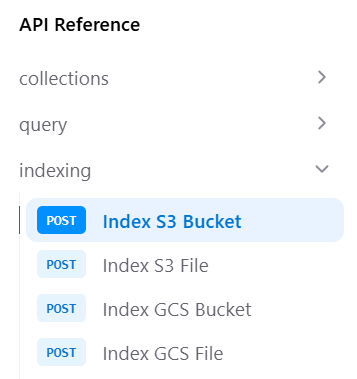
Captain Indexing API Endpoints

Option A: Index AWS S3 Bucket

See the Index S3 Bucket - API Reference

Need AWS credentials? See the Connect Cloud Storage Guide for step-by-step instructions.

curl
$curl -X POST https://api.runcaptain.com/v2/collections/my_first_collection/index/s3 \
> -H "Authorization: Bearer $CAPTAIN_API_KEY" \
> -H "X-Organization-ID: $CAPTAIN_ORG_ID" \
> -H "Content-Type: application/json" \
> -d '{
> "bucket_name": "my-s3-bucket",
> "aws_access_key_id": "AKIAIOSFODNN7EXAMPLE",
> "aws_secret_access_key": "wJalrXUtnFEMI/K7MDENG/bPxRfiCYEXAMPLEKEY",
> "bucket_region": "us-east-1"
> }'
Python
1import requests
2
3BASE_URL = "https://api.runcaptain.com"
4COLLECTION_NAME = "my_first_collection"
5
6headers = {
7 "Authorization": f"Bearer {API_KEY}",
8 "X-Organization-ID": ORG_ID,
9 "Content-Type": "application/json"
10}
11
12response = requests.post(
13 f"{BASE_URL}/v2/collections/{COLLECTION_NAME}/index/s3",
14 headers=headers,
15 json={
16 "bucket_name": "my-s3-bucket",
17 "aws_access_key_id": "AKIAIOSFODNN7EXAMPLE",
18 "aws_secret_access_key": "wJalrXUtnFEMI/K7MDENG/bPxRfiCYEXAMPLEKEY",
19 "bucket_region": "us-east-1"
20 }
21)
22
23job_id = response.json()['job_id']
24print(f"Indexing started! Job ID: {job_id}")
TypeScript
1const BASE_URL = "https://api.runcaptain.com";
2const COLLECTION_NAME = "my_first_collection";
3
4const response = await fetch(
5 `${BASE_URL}/v2/collections/${COLLECTION_NAME}/index/s3`,
6 {
7 method: "POST",
8 headers: {
9 "Authorization": `Bearer ${API_KEY}`,
10 "X-Organization-ID": ORG_ID,
11 "Content-Type": "application/json"
12 },
13 body: JSON.stringify({
14 bucket_name: "my-s3-bucket",
15 aws_access_key_id: "AKIAIOSFODNN7EXAMPLE",
16 aws_secret_access_key: "wJalrXUtnFEMI/K7MDENG/bPxRfiCYEXAMPLEKEY",
17 bucket_region: "us-east-1"
18 })
19 }
20);
21
22const result = await response.json();
23const jobId = result.job_id;
24console.log(`Indexing started! Job ID: ${jobId}`);
Ruby
1require 'net/http'
2require 'json'
3require 'uri'
4
5BASE_URL = "https://api.runcaptain.com"
6COLLECTION_NAME = "my_first_collection"
7
8uri = URI("#{BASE_URL}/v2/collections/#{COLLECTION_NAME}/index/s3")
9http = Net::HTTP.new(uri.host, uri.port)
10http.use_ssl = true
11
12request = Net::HTTP::Post.new(uri)
13request["Authorization"] = "Bearer #{API_KEY}"
14request["X-Organization-ID"] = ORG_ID
15request["Content-Type"] = "application/json"
16request.body = {
17 bucket_name: "my-s3-bucket",
18 aws_access_key_id: "AKIAIOSFODNN7EXAMPLE",
19 aws_secret_access_key: "wJalrXUtnFEMI/K7MDENG/bPxRfiCYEXAMPLEKEY",
20 bucket_region: "us-east-1"
21}.to_json
22
23response = http.request(request)
24result = JSON.parse(response.body)
25job_id = result["job_id"]
26puts "Indexing started! Job ID: #{job_id}"

Option B: Index Google Cloud Storage Bucket

See the Index GCS Bucket - API Reference

Need GCS credentials? See the Connect Cloud Storage Guide for step-by-step instructions.

curl
$curl -X POST https://api.runcaptain.com/v2/collections/my_first_collection/index/gcs \
> -H "Authorization: Bearer $CAPTAIN_API_KEY" \
> -H "X-Organization-ID: $CAPTAIN_ORG_ID" \
> -H "Content-Type: application/json" \
> -d '{
> "bucket_name": "my-gcs-bucket",
> "service_account_json": "{\"type\":\"service_account\",\"project_id\":\"...\"}"
> }'
Python
1import requests
2
3BASE_URL = "https://api.runcaptain.com"
4COLLECTION_NAME = "my_first_collection"
5
6headers = {
7 "Authorization": f"Bearer {API_KEY}",
8 "X-Organization-ID": ORG_ID,
9 "Content-Type": "application/json"
10}
11
12# Load your service account JSON
13with open('service-account-key.json', 'r') as f:
14 service_account_json = f.read()
15
16response = requests.post(
17 f"{BASE_URL}/v2/collections/{COLLECTION_NAME}/index/gcs",
18 headers=headers,
19 json={
20 "bucket_name": "my-gcs-bucket",
21 "service_account_json": service_account_json
22 }
23)
24
25job_id = response.json()['job_id']
26print(f"Indexing started! Job ID: {job_id}")
TypeScript
1import { readFileSync } from 'fs';
2
3const BASE_URL = "https://api.runcaptain.com";
4const COLLECTION_NAME = "my_first_collection";
5
6// Load your service account JSON
7const serviceAccountJson = readFileSync('service-account-key.json', 'utf-8');
8
9const response = await fetch(
10 `${BASE_URL}/v2/collections/${COLLECTION_NAME}/index/gcs`,
11 {
12 method: "POST",
13 headers: {
14 "Authorization": `Bearer ${API_KEY}`,
15 "X-Organization-ID": ORG_ID,
16 "Content-Type": "application/json"
17 },
18 body: JSON.stringify({
19 bucket_name: "my-gcs-bucket",
20 service_account_json: serviceAccountJson
21 })
22 }
23);
24
25const result = await response.json();
26const jobId = result.job_id;
27console.log(`Indexing started! Job ID: ${jobId}`);
Ruby
1require 'net/http'
2require 'json'
3require 'uri'
4
5BASE_URL = "https://api.runcaptain.com"
6COLLECTION_NAME = "my_first_collection"
7
8# Load your service account JSON
9service_account_json = File.read('service-account-key.json')
10
11uri = URI("#{BASE_URL}/v2/collections/#{COLLECTION_NAME}/index/gcs")
12http = Net::HTTP.new(uri.host, uri.port)
13http.use_ssl = true
14
15request = Net::HTTP::Post.new(uri)
16request["Authorization"] = "Bearer #{API_KEY}"
17request["X-Organization-ID"] = ORG_ID
18request["Content-Type"] = "application/json"
19request.body = {
20 bucket_name: "my-gcs-bucket",
21 service_account_json: service_account_json
22}.to_json
23
24response = http.request(request)
25result = JSON.parse(response.body)
26job_id = result["job_id"]
27puts "Indexing started! Job ID: #{job_id}"

Option C: Index Azure Blob Storage

See the Index Azure Container - API Reference

curl
$curl -X POST https://api.runcaptain.com/v2/collections/my_first_collection/index/azure \
> -H "Authorization: Bearer $CAPTAIN_API_KEY" \
> -H "X-Organization-ID: $CAPTAIN_ORG_ID" \
> -H "Content-Type: application/json" \
> -d '{
> "container_name": "my-container",
> "account_name": "mystorageaccount",
> "account_key": "your_account_key_base64"
> }'
Python
1import requests
2
3BASE_URL = "https://api.runcaptain.com"
4COLLECTION_NAME = "my_first_collection"
5
6headers = {
7 "Authorization": f"Bearer {API_KEY}",
8 "X-Organization-ID": ORG_ID,
9 "Content-Type": "application/json"
10}
11
12response = requests.post(
13 f"{BASE_URL}/v2/collections/{COLLECTION_NAME}/index/azure",
14 headers=headers,
15 json={
16 "container_name": "my-container",
17 "account_name": "mystorageaccount",
18 "account_key": "your_account_key_base64"
19 }
20)
21
22job_id = response.json()['job_id']
23print(f"Indexing started! Job ID: {job_id}")
TypeScript
1const BASE_URL = "https://api.runcaptain.com";
2const COLLECTION_NAME = "my_first_collection";
3
4const response = await fetch(
5 `${BASE_URL}/v2/collections/${COLLECTION_NAME}/index/azure`,
6 {
7 method: "POST",
8 headers: {
9 "Authorization": `Bearer ${API_KEY}`,
10 "X-Organization-ID": ORG_ID,
11 "Content-Type": "application/json"
12 },
13 body: JSON.stringify({
14 container_name: "my-container",
15 account_name: "mystorageaccount",
16 account_key: "your_account_key_base64"
17 })
18 }
19);
20
21const result = await response.json();
22const jobId = result.job_id;
23console.log(`Indexing started! Job ID: ${jobId}`);

Monitor Indexing Progress

See the Get Job Status - API Reference

Python
1import time
2
3while True:
4 response = requests.get(
5 f"{BASE_URL}/v2/jobs/{job_id}",
6 headers={"Authorization": f"Bearer {API_KEY}"}
7 )
8
9 result = response.json()
10 status = result.get('status')
11 progress = result.get('progress_message', '')
12 print(f"Status: {status} - {progress}")
13
14 if status in ['completed', 'completed_with_failures', 'failed', 'cancelled']:
15 if status in ['completed', 'completed_with_failures']:
16 print("Indexing complete!")
17 final = result.get('result', {})
18 print(f"Files indexed: {final.get('files_indexed', 0)}")
19 break
20
21 time.sleep(5)
TypeScript
1const sleep = (ms: number) => new Promise(resolve => setTimeout(resolve, ms));
2
3while (true) {
4 const response = await fetch(
5 `${BASE_URL}/v2/jobs/${jobId}`,
6 {
7 headers: { "Authorization": `Bearer ${API_KEY}` }
8 }
9 );
10
11 const result = await response.json();
12 const status = result.status;
13 const progress = result.progress_message || '';
14 console.log(`Status: ${status} - ${progress}`);
15
16 if (['completed', 'completed_with_failures', 'failed', 'cancelled'].includes(status)) {
17 if (status === 'completed' || status === 'completed_with_failures') {
18 console.log("Indexing complete!");
19 const final = result.result || {};
20 console.log(`Files indexed: ${final.files_indexed || 0}`);
21 }
22 break;
23 }
24
25 await sleep(5000);
26}
Ruby
1loop do
2 uri = URI("#{BASE_URL}/v2/jobs/#{job_id}")
3 http = Net::HTTP.new(uri.host, uri.port)
4 http.use_ssl = true
5
6 request = Net::HTTP::Get.new(uri)
7 request["Authorization"] = "Bearer #{API_KEY}"
8
9 response = http.request(request)
10 result = JSON.parse(response.body)
11 status = result["status"]
12 progress = result["progress_message"] || ""
13 puts "Status: #{status} - #{progress}"
14
15 if %w[completed completed_with_failures failed cancelled].include?(status)
16 if %w[completed completed_with_failures].include?(status)
17 puts "Indexing complete!"
18 final = result["result"] || {}
19 puts "Files indexed: #{final['files_indexed'] || 0}"
20 end
21 break
22 end
23
24 sleep 5
25end

[3/3] Querying Collections

Once your files are indexed, you can query the collection. See the Query Collection - API Reference

Querying with LLM Inference

Query your collection with AI-generated answers:

curl
$curl -X POST https://api.runcaptain.com/v2/collections/my_first_collection/query \
> -H "Authorization: Bearer $CAPTAIN_API_KEY" \
> -H "X-Organization-ID: $CAPTAIN_ORG_ID" \
> -H "Content-Type: application/json" \
> -d '{
> "query": "What are the revenue projections for Q4?",
> "inference": true
> }'
Python
1import uuid
2
3response = requests.post(
4 f"{BASE_URL}/v2/collections/{COLLECTION_NAME}/query",
5 headers={
6 "Authorization": f"Bearer {API_KEY}",
7 "X-Organization-ID": ORG_ID,
8 "Content-Type": "application/json",
9 "Idempotency-Key": str(uuid.uuid4())
10 },
11 json={
12 "query": "What are the revenue projections for Q4?",
13 "inference": True # Get LLM-generated answers based on the relevant sections that were retrieved
14 }
15)
16
17result = response.json()
18print("Answer:", result['response'])
19print("\nRelevant Documents:")
20for doc in result.get('relevant_documents', []):
21 print(f" - {doc['document_name']} (relevancy: {doc['relevancy_score']})")
TypeScript
1import { randomUUID } from 'crypto';
2
3const response = await fetch(
4 `${BASE_URL}/v2/collections/${COLLECTION_NAME}/query`,
5 {
6 method: "POST",
7 headers: {
8 "Authorization": `Bearer ${API_KEY}`,
9 "X-Organization-ID": ORG_ID,
10 "Content-Type": "application/json",
11 "Idempotency-Key": randomUUID()
12 },
13 body: JSON.stringify({
14 query: "What are the revenue projections for Q4?",
15 inference: true // Get LLM-generated answers based on the relevant sections that were retrieved
16 })
17 }
18);
19
20const result = await response.json();
21console.log("Answer:", result.response);
22console.log("\nRelevant Documents:");
23for (const doc of result.relevant_documents || []) {
24 console.log(` - ${doc.document_name} (relevancy: ${doc.relevancy_score})`);
25}
Ruby
1require 'securerandom'
2
3uri = URI("#{BASE_URL}/v2/collections/#{COLLECTION_NAME}/query")
4http = Net::HTTP.new(uri.host, uri.port)
5http.use_ssl = true
6
7request = Net::HTTP::Post.new(uri)
8request["Authorization"] = "Bearer #{API_KEY}"
9request["X-Organization-ID"] = ORG_ID
10request["Content-Type"] = "application/json"
11request["Idempotency-Key"] = SecureRandom.uuid
12request.body = {
13 query: "What are the revenue projections for Q4?",
14 inference: true # Get LLM-generated answers based on the relevant sections that were retrieved
15}.to_json
16
17response = http.request(request)
18result = JSON.parse(response.body)
19puts "Answer: #{result['response']}"
20puts "\nRelevant Documents:"
21(result["relevant_documents"] || []).each do |doc|
22 puts " - #{doc['document_name']} (relevancy: #{doc['relevancy_score']})"
23end

Querying without LLM Inference

Fetch relevant context without AI-generated answers:

curl
$curl -X POST https://api.runcaptain.com/v2/collections/my_first_collection/query \
> -H "Authorization: Bearer $CAPTAIN_API_KEY" \
> -H "X-Organization-ID: $CAPTAIN_ORG_ID" \
> -H "Content-Type: application/json" \
> -d '{
> "query": "What are the revenue projections for Q4?",
> "inference": false,
> "top_k": 20
> }'
Python
1response = requests.post(
2 f"{BASE_URL}/v2/collections/{COLLECTION_NAME}/query",
3 headers={
4 "Authorization": f"Bearer {API_KEY}",
5 "X-Organization-ID": ORG_ID,
6 "Content-Type": "application/json"
7 },
8 json={
9 "query": "What are the revenue projections for Q4?",
10 "inference": False, # Relevant sections are rapidly fetched without LLM inference
11 "top_k": 20 # Get top 20 results (default: 10)
12 }
13)
14
15result = response.json()
16print("Query results:")
17for doc in result.get('relevant_documents', []):
18 print(f" - {doc['document_name']} (score: {doc['relevancy_score']})")
TypeScript
1const response = await fetch(
2 `${BASE_URL}/v2/collections/${COLLECTION_NAME}/query`,
3 {
4 method: "POST",
5 headers: {
6 "Authorization": `Bearer ${API_KEY}`,
7 "X-Organization-ID": ORG_ID,
8 "Content-Type": "application/json"
9 },
10 body: JSON.stringify({
11 query: "What are the revenue projections for Q4?",
12 inference: false, // Relevant sections are rapidly fetched without LLM inference
13 top_k: 20 // Get top 20 results (default: 10)
14 })
15 }
16);
17
18const result = await response.json();
19console.log("Query results:");
20for (const doc of result.relevant_documents || []) {
21 console.log(` - ${doc.document_name} (score: ${doc.relevancy_score})`);
22}
Ruby
1uri = URI("#{BASE_URL}/v2/collections/#{COLLECTION_NAME}/query")
2http = Net::HTTP.new(uri.host, uri.port)
3http.use_ssl = true
4
5request = Net::HTTP::Post.new(uri)
6request["Authorization"] = "Bearer #{API_KEY}"
7request["X-Organization-ID"] = ORG_ID
8request["Content-Type"] = "application/json"
9request.body = {
10 query: "What are the revenue projections for Q4?",
11 inference: false, # Relevant sections are rapidly fetched without LLM inference
12 top_k: 20 # Get top 20 results (default: 10)
13}.to_json
14
15response = http.request(request)
16result = JSON.parse(response.body)
17puts "Query results:"
18(result["relevant_documents"] || []).each do |doc|
19 puts " - #{doc['document_name']} (score: #{doc['relevancy_score']})"
20end

Querying with Streaming

Get real-time responses as they’re generated:

Python
1import json
2
3response = requests.post(
4 f"{BASE_URL}/v2/collections/{COLLECTION_NAME}/query",
5 headers={
6 "Authorization": f"Bearer {API_KEY}",
7 "X-Organization-ID": ORG_ID,
8 "Content-Type": "application/json"
9 },
10 json={
11 "query": "Summarize all security incidents mentioned",
12 "inference": True, # Get LLM-generated answers based on the relevant sections that were retrieved
13 "stream": True
14 },
15 stream=True # Important: enable streaming
16)
17
18# Process streamed response
19for line in response.iter_lines():
20 if line:
21 line_text = line.decode('utf-8')
22 if line_text.startswith('data: '):
23 data = line_text[6:]
24 try:
25 parsed = json.loads(data)
26 if parsed.get('type') == 'stream_complete':
27 print("\nStream complete!")
28 break
29 except json.JSONDecodeError:
30 print(data, end='', flush=True)
TypeScript
1const response = await fetch(
2 `${BASE_URL}/v2/collections/${COLLECTION_NAME}/query`,
3 {
4 method: "POST",
5 headers: {
6 "Authorization": `Bearer ${API_KEY}`,
7 "X-Organization-ID": ORG_ID,
8 "Content-Type": "application/json"
9 },
10 body: JSON.stringify({
11 query: "Summarize all security incidents mentioned",
12 inference: true, // Get LLM-generated answers based on the relevant sections that were retrieved
13 stream: true
14 })
15 }
16);
17
18// Process streamed response
19const reader = response.body!.getReader();
20const decoder = new TextDecoder();
21
22while (true) {
23 const { done, value } = await reader.read();
24 if (done) break;
25
26 const chunk = decoder.decode(value);
27 const lines = chunk.split('\n');
28
29 for (const line of lines) {
30 if (line.startsWith('data: ')) {
31 const data = line.slice(6);
32 try {
33 const parsed = JSON.parse(data);
34 if (parsed.type === 'stream_complete') {
35 console.log("\nStream complete!");
36 break;
37 }
38 } catch {
39 process.stdout.write(data);
40 }
41 }
42 }
43}
Ruby
1uri = URI("#{BASE_URL}/v2/collections/#{COLLECTION_NAME}/query")
2http = Net::HTTP.new(uri.host, uri.port)
3http.use_ssl = true
4
5request = Net::HTTP::Post.new(uri)
6request["Authorization"] = "Bearer #{API_KEY}"
7request["X-Organization-ID"] = ORG_ID
8request["Content-Type"] = "application/json"
9request.body = {
10 query: "Summarize all security incidents mentioned",
11 inference: true, # Get LLM-generated answers based on the relevant sections that were retrieved
12 stream: true
13}.to_json
14
15# Process streamed response
16http.request(request) do |response|
17 response.read_body do |chunk|
18 chunk.each_line do |line|
19 if line.start_with?("data: ")
20 data = line[6..-1].strip
21 begin
22 parsed = JSON.parse(data)
23 if parsed["type"] == "stream_complete"
24 puts "\nStream complete!"
25 break
26 end
27 rescue JSON::ParserError
28 print data
29 end
30 end
31 end
32 end
33end

Other Info

Environment Scoping

API keys are scoped to environments:

  • Development (cap_dev_*) - For testing and development
  • Staging (cap_stage_*) - For pre-production testing
  • Production (cap_prod_*) - For production use

Collections created with a development key can only be accessed with development keys from the same organization.

Supported File Types

Captain supports 30+ file types including:

Documents: PDF, DOCX, TXT, MD, RTF, ODT Spreadsheets: XLSX, XLS, CSV Presentations: PPTX, PPT Images: JPG, PNG (with OCR) Code: PY, JS, TS, HTML, CSS, PHP, JAVA Data: JSON, XML

Contact support@runcaptain.com to request file types.

More Data Sources

Beyond cloud storage, Captain connects to Google Drive, SharePoint, Notion, Slack, Snowflake, Linear, Jira, and more. See the Integrations page for the full list of supported data sources and the difference between Indexed Search and Live Search.

Getting Help

Need assistance? We’re here to help!