
Multimodal Search
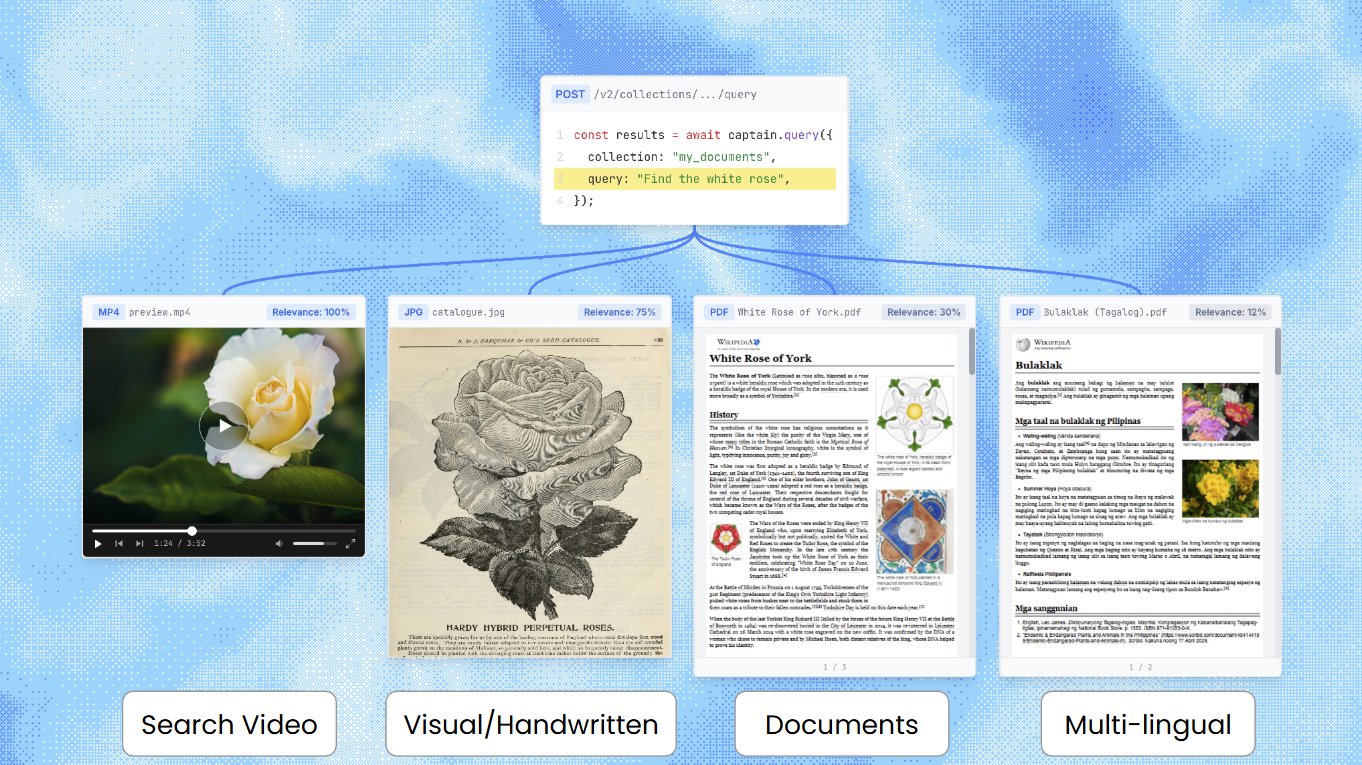
Captain supports native multimodal search across text documents, images, video, and audio files. Upload any combination of file types to a single collection, and search across all of them with one query. Captain handles format detection, media segmentation, embedding, and cross-modal ranking automatically.
Benchmark Results
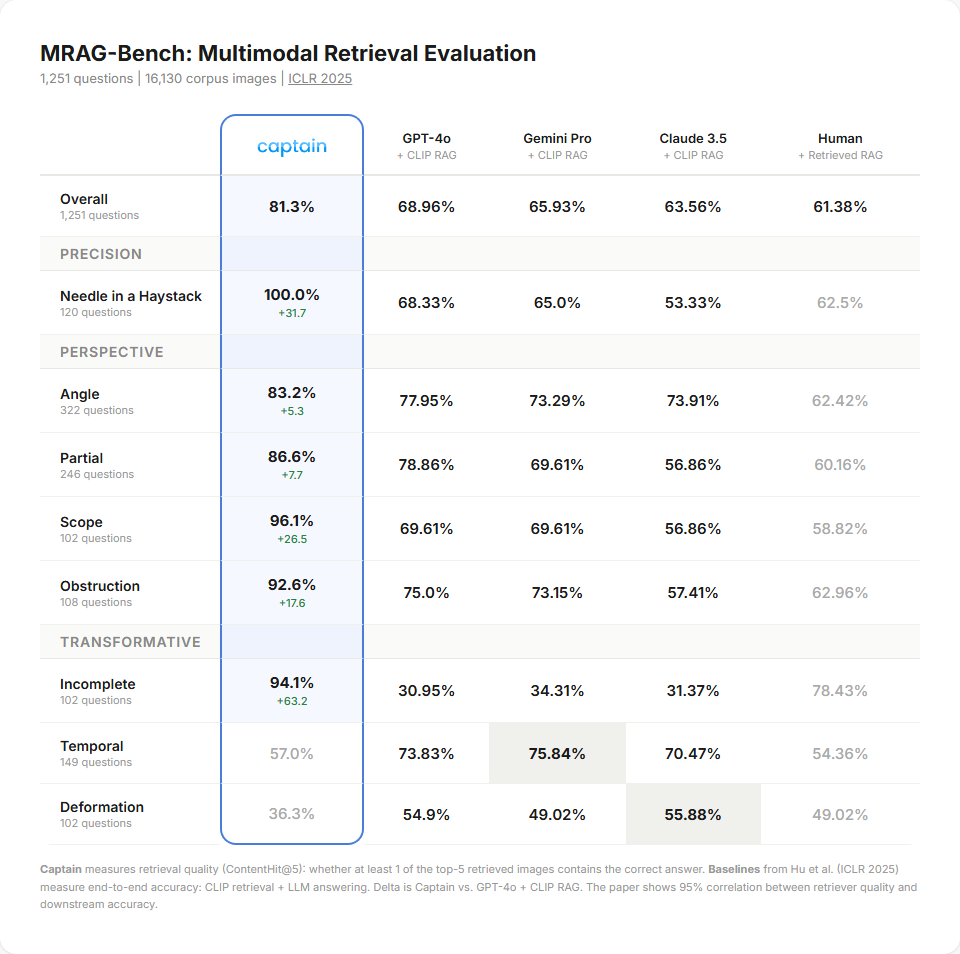
On MRAG-Bench (ICLR 2025), a standardized academic benchmark for vision-centric retrieval with 16,130 images and 1,251 questions, Captain achieves 81.3% retrieval accuracy-outperforming every end-to-end RAG system tested in the paper, including GPT-4o with CLIP retrieval (68.96%). Full results, methodology, and evaluation code are available in our open-source evaluation repository.
Supported File Types
How It Works
Captain uses a dual embedding strategy for media files. Each image, video segment, or audio segment is embedded in two ways:
-
Native multimodal embedding (3072 dimensions): The raw bytes-image pixels, audio waveform, video frames-are embedded directly. This captures the actual visual, auditory, or temporal content.
-
Text embedding (1024 dimensions): A model generates a structured description of what the media actually contains (a transcript for audio, a visual description for images and video), and that text is embedded alongside your text documents. Your query matches the content of the media, not just its filename.
This dual approach means a query for a song finds audio files both by matching the sound of the music (native embedding) and by matching the transcribed lyrics (text embedding). A search for the line “uptown funk you up” surfaces the right track even when the file is named track03.mp3.
Why reranking is required
Relevance scores from text search and media search are produced by different models on different scales. A text reranker score of 0.7 and a media cosine similarity of 0.7 do not mean the same thing and cannot be sorted into a single list.
Captain solves this with reranker-informed pipeline weighting: the text reranker’s scores on media descriptions determine how much weight each modality gets in the final ranking. Without the reranker there is no way to produce a meaningful cross-modal ranking, so multimodal collections always rerank. Captain applies it automatically; you do not need to set rerank=true yourself.
Text-only collections
If your collection contains only text documents, multimodal search adds zero overhead. Captain automatically detects whether a collection has media content and skips the multimodal pipeline entirely for text-only collections.
Querying Multimodal Collections
Multimodal collections (images, video, or audio) always rerank, and the rerank flag is ignored for them. If you pass rerank=false on a multimodal collection, the query still succeeds, reranking is applied, and the response includes a warnings entry. Text-only collections honor rerank=false as before.
Example: Multimodal Search
Response:
Request Fields
Response Fields (per search result)
Spreadsheet row/column provenance
For spreadsheet sources (XLSX, XLS, CSV, TSV), each chunk is a structure-aware block of rows
rendered as a markdown table, and carries first-class row/column provenance - the tabular
analogue of pageStart/pageEnd for PDFs. This lets you ground an answer in concrete
coordinates, e.g. “Sheet ‘YTD Sales’, rows 2–13, columns Year–Ytd Total Sales”.
These fields are null for non-spreadsheet sources, exactly as pageStart/pageEnd are null
for spreadsheets. The chunk’s content repeats the header row, so the table is self-describing
even when read in isolation.
Media segment time range
For video and audio, each result is one segment of the source file. Its time range is
returned as the structured fields metadata.startSec and metadata.endSec (seconds),
the time analogue of pageStart/pageEnd for documents. Read these directly; do not parse the
content string.
The content field’s first line is a citation label ([Video: <filename>]) followed by the
VLM description and (for video) the spoken transcript. The label no longer carries the time range.
startSec/endSec are null for non-media (text/PDF) results, just as pageStart/pageEnd are
null for media.
If you pass rerank=false on a multimodal collection, the query still succeeds. Reranking is applied anyway, and the response carries a warnings entry telling you the flag was overridden:
Text-only collections honor rerank=false as before.
Indexing Media Files
Media files are indexed through the same endpoints as text documents. No special configuration is needed-Captain automatically detects the file type and routes it through the appropriate processing pipeline.
Transcription language (video and audio)
Speech in video and audio files is transcribed with automatic language detection by default — Spanish interviews come back as Spanish text, Portuguese as Portuguese, and so on, with no configuration. Detection runs on the whole file’s audio, so it is reliable even for short clips.
When you already know the spoken language (or a file mixes languages and you want to force the
dominant one), pass the optional transcription_language field on any indexing request, as an
AWS Transcribe language code
such as es-US, es-ES, pt-BR, or en-US:
- Omit the field to auto-detect (recommended for most workloads).
- Codes are case-insensitive (
es-usis accepted and canonicalized toes-US); an unsupported value is rejected with a422listing example codes. - The field applies to video and audio files only; other file types in the same request ignore it.
- Each result’s
metadata.transcriptLanguagereports the language the transcript was actually recognized in. - Files indexed before language support (or while a former English-only default applied) can be
re-indexed with
overwrite_existing: trueto regenerate their transcripts.
Index from cloud storage
Index from URL
Upload files directly
Using Retrieved Media Chunks
The query endpoint returns retrieved chunks across all content types. Your application can pass those chunks to an LLM, cite them directly, or store chunk IDs for later metadata and relation work.
Media results use labels such as [Video: meeting_recording.mp4] followed by the VLM-generated description, with the segment time range in metadata.startSec/metadata.endSec.
Limitations
- Video segments: Maximum 120 seconds per segment. Longer videos are automatically split.
- Mixed-language media: Language detection picks one dominant language per file. For video or audio that switches languages mid-file, force the dominant one with
transcription_language. - Audio segments: Maximum 80 seconds per segment. Longer audio files are automatically split.
- Format conversion: Some formats are converted at ingestion (FLAC→MP3, WebP→PNG, AVI→MP4). The original file is preserved.
- Reranking: Multimodal collections always rerank; the
rerankflag is ignored for them, and awarningsentry is returned if you passrerank=false. Text-only collections are unaffected. - Latency: Multimodal queries take ~1-2 seconds (text embedding + media search + reranking). Text-only queries are unchanged. We are continuously optimizing query latency to make search as fast as possible without compromising accuracy.